Best Printer for iPhone: AirPrint, Photos and Documents
How to pick a printer for your iPhone: what AirPrint does, photo printers versus document printers, and four models from our lineup that fit.
At a glance
For snapshots from an iPhone, the Canon SELPHY CP1500 makes 4 x 6 inch prints over Wi-Fi, and the Epson EcoTank Photo ET-8550 handles borderless photos up to 13 x 19 inches. For everyday documents with AirPrint, choose the Epson EcoTank ET-2980.

Printing from a phone used to mean emailing a file to yourself, finding a laptop and hoping the drivers cooperated. On an iPhone it is now a two-tap job, as long as you pick a printer that speaks Apple’s language. The harder question is what you want to print. A school form and a framed 8 x 10 photo need very different machines, and the printer that suits one is often a poor fit for the other.
This guide covers how AirPrint works, how to decide between a photo printer and a document printer, and which models in our lineup fit an iPhone household. We did not handle these printers ourselves. Everything below comes from the manufacturers’ own pages and from Apple, and each profile linked here lists its sources. For the full ranked list, see our best printers of 2026 comparison.
How AirPrint Works on an iPhone
AirPrint is Apple’s built-in printing system. According to Apple, you can print from iPhone, iPad, Mac or Apple Vision Pro without installing drivers or other software, provided you have an AirPrint-enabled printer connected to your Wi-Fi network and your Apple device is on that same network. Apple says AirPrint is built into most popular printer models.
The steps, from Apple’s support page, are short:
- Open the app you want to print from, such as Photos, Files, Safari or Mail.
- Tap the Share or Actions button and scroll to Print.
- Tap “No Printer Selected” and choose your printer.
- Pick the number of copies and which pages to print, then tap Print.
A few practical notes follow from that page. Not every app offers a Print option, so if you cannot find it, check the app’s help. A printer plugged into a computer by USB does not become an AirPrint printer, and Apple specifically lists USB connections through an AirPort Base Station or Time Capsule, and Bluetooth connections to a computer, as unsupported. And because both devices must share a network, a printer that has dropped off your Wi-Fi is the usual reason it does not appear in the list.
Before you buy, confirm AirPrint on the maker’s specifications. Apple suggests searching its list of AirPrint-enabled printers or asking the manufacturer if a model is missing. Every printer recommended below lists AirPrint on its maker’s page.
Photo Printer or Document Printer?
Start with what you will print most. Most people who search for a printer for an iPhone want one of three things.
- Small snapshots for the fridge, scrapbooks or a party. A compact photo printer is the simplest answer. It prints only photos, but it is small, quick and does not leave ink to dry out.
- Large or borderless photos, art prints and crafts. A six-color tank printer gives smoother tones and wide-format paper, and it also prints documents.
- Homework, forms, recipes and the occasional photo. An everyday tank all-in-one with AirPrint covers this and keeps running costs low.
Two points apply to all of them. First, photo quality depends on photo paper, not just the printer: plain paper makes photos look flat on almost any model. Second, an iPhone sends the job over Wi-Fi, so a printer with a weak signal or a 2.4 GHz-only radio can be slow to connect. Place it where your router reaches easily.
Running costs are worth a word, too. We do not quote cost-per-page figures because they change. What is stable are the yields the makers publish, such as Epson’s rating of up to 6,600 black pages or 5,500 color pages from the ink included with an EcoTank. Tank printers cost more to buy but far less to run than cartridge models, which makes them the usual pick for households that print every week.
Canon SELPHY CP1500: Snapshots From Your iPhone
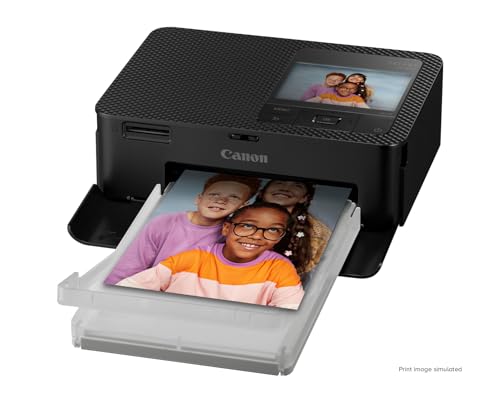
A pocket-size dye-sublimation printer for 4 x 6 inch prints straight from an iPhone over Wi-Fi, with AirPrint and Canon's layout app. Photos only, no documents.
The Canon SELPHY CP1500 is the easiest way to get a real print of a phone picture. It prints postcard-size (4.0 x 6.0 inches) photos, plus smaller card and label sizes, using a compact dye-sublimation process. Canon rates a postcard-size print at about 41 seconds.
For iPhone owners, Canon’s Canadian page for the model says you can print easily with AirPrint, and it also lists the free SELPHY Layout companion app, which adds collages and other layouts. Canon’s Asia page adds iOS Siri shortcuts and says up to 8 devices can connect by direct connection, which is handy when a group wants to share prints at a party. The printer also has an SD card slot for camera photos and an optional battery pack, sold separately, for printing away from an outlet.
The limits are plain. It does not print documents, copy or scan, and prints top out at postcard size. Canon sells paper and ink as matched sets, so decide whether that suits how many prints you want. If it sounds right, read our Canon SELPHY CP1500 profile for the full specs and caveats.
Epson EcoTank Photo ET-8550: Larger Photos and Documents
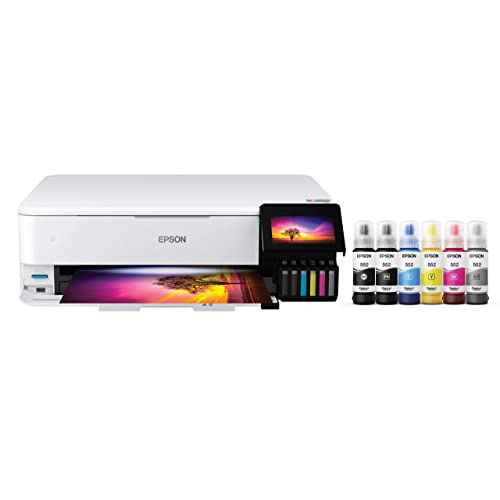
A six-color refillable-tank printer for borderless photos up to 13 x 19 inches, with AirPrint, Wi-Fi Direct and Epson Smart Panel. Also handles everyday documents.
If a 4 x 6 inch print is not enough, the Epson EcoTank Photo ET-8550 is the step up. According to Epson, it uses a six-color Claria ET Premium ink system with black, photo black, cyan, magenta, yellow and gray, and prints borderless from 3.5 x 5 inches up to 13 x 19 inches. Epson’s page lists photo and specialty paper up to 300 g/m², with a maximum thickness of 1.3 mm (about 0.05 inch) through the rear feed, so heavier art paper is an option.
Phone support is broad. Epson lists Apple AirPrint under mobile printing, the free Epson Smart Panel app for iOS and Android, and Wi-Fi Direct as a standard connection, along with an SD card slot. Because it also copies, scans and prints documents, it can be the only printer in a household that cares about photos.
The cost is size and complexity: Epson lists it at 24.5 lb with a footprint that opens to nearly 30 inches deep when printing, a flatbed scanner with no document feeder, and a 1-year limited warranty. If you only print snapshots, it is more machine than you need. Our Epson EcoTank Photo ET-8550 profile has the details.
Epson EcoTank ET-2980: Everyday Printing From Your Phone
A compact refillable-tank all-in-one with AirPrint, auto 2-sided printing and ink rated for up to 6,600 black pages in the box. A simple choice for homework, forms and occasional photos.
Most iPhone households do not need a photo specialist. They need a printer that handles a permission slip, a boarding pass and a birthday photo without fuss. The Epson EcoTank ET-2980 fits that. Epson’s page lists Apple AirPrint, Mopria Print Service and Mopria Scan, and the Epson Smart Panel app for printing and scanning, which needs a download and may bring data fees from your carrier.
It prints at 15 pages per minute black and 8 color (ISO), prints automatically on both sides, and takes a 100-sheet tray. Connectivity is built-in USB and Wi-Fi, and Epson’s page does not mention Wi-Fi Direct or Ethernet, so a good Wi-Fi signal where the printer sits matters. Scanning is flatbed only, which is fine for single pages.
It works best for people who print regularly, since tank printers reward steady use. Read the Epson EcoTank ET-2980 profile for specs, and if you scan stacks of paper and want a feeder, compare it with the Epson EcoTank ET-4950 profile.
Epson EcoTank ET-4950: When Documents Come First
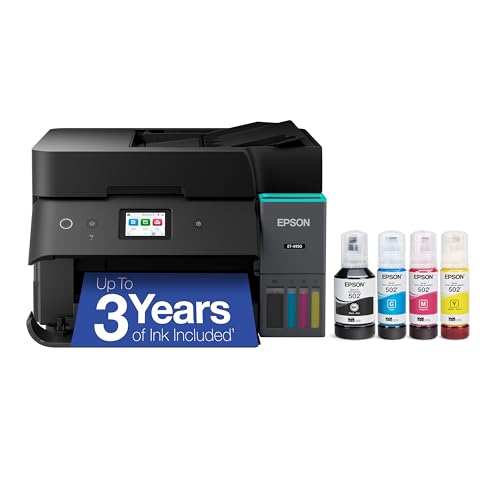
A refillable-tank all-in-one with AirPrint, a 250-sheet tray, an auto document feeder, Ethernet and fax, for iPhone households that handle plenty of paperwork.
If your iPhone is mostly sending documents, such as work files, tax forms and scans of school paperwork, the Epson EcoTank ET-4950 is the better tool. Epson’s page lists AirPrint, Mopria Print Service and Mopria Scan, and the Smart Panel app. It adds an auto document feeder, a 250-sheet tray, a 2.4-inch color display, Ethernet alongside Wi-Fi, and a fax configuration. Speed is rated at 18 ppm black and 9 ppm color (ISO).
Epson rates the included bottles for up to 6,600 black or 5,500 color pages, about 3 years at 150 pages a month. It is built as an office all-in-one, so photos are decent but not its specialty. For serious photo work, the ET-8550 above is the more natural fit. The Epson EcoTank ET-4950 profile covers the rest.
Which One Should You Buy?
- Snapshots only, small space: the Canon SELPHY CP1500.
- Big or borderless photos, art, crafts, plus documents: the Epson EcoTank Photo ET-8550.
- Light, regular home printing from phones: the Epson EcoTank ET-2980.
- Heavy document and scanning use: the Epson EcoTank ET-4950.
Many households pair a photo printer with a document printer, since a SELPHY costs little desk space. If that is your plan, choose the document printer first. If you want something different from this shortlist, the full ranking in our best printers of 2026 covers laser models, which also support AirPrint. The Brother MFC-L2820DW profile is a good example for black-and-white paperwork.
Tips for Printing From an iPhone
- Keep both devices on one network. If the printer does not show up, check that your iPhone is not on a guest network or cellular only.
- Use photo paper for photos, and set the paper type on the print screen when the printer offers it.
- Update the printer firmware. Makers release updates that improve connectivity. Use the maker’s app to check.
- Mind the apps. AirPrint needs nothing extra, but the maker’s app often adds scanning, layouts and remote printing.
- Know the extras. Wi-Fi Direct and direct connections are useful for guests, but they differ by model.
Sources
- Apple Support: About AirPrint
- Apple Support: Use AirPrint to print from your iPhone or iPad
- Canon SELPHY CP1500 product page (Canon Canada)
- Canon SELPHY CP1500 specifications (Canon Asia)
- Epson EcoTank Photo ET-8550 official product page
- Epson EcoTank ET-2980 official product page
- Epson EcoTank ET-4950 official product page
Frequently asked questions
Do I need to install an app to print from my iPhone?
Not with an AirPrint printer. Apple says you do not need to install additional drivers or other software. You open the Share menu, tap Print, and pick the printer, as long as the printer and the iPhone are on the same Wi-Fi network. Maker apps such as Epson Smart Panel or Canon's SELPHY Layout add extras like layouts and scanning.
How do I know if a printer works with AirPrint?
Look for AirPrint in the maker's mobile printing specs, or search Apple's list of AirPrint-enabled printers by brand and model. Apple also suggests asking the manufacturer if a model is not listed. Every printer in this guide has AirPrint on its maker's page.
What is the best kind of printer for iPhone photos?
For small snapshots, a compact dye-sublimation printer such as the Canon SELPHY CP1500 is the simplest route, with 4 x 6 inch prints that Canon rates at about 41 seconds each. For larger prints up to 13 x 19 inches, or for borderless photos plus documents, a six-color tank printer like the Epson EcoTank Photo ET-8550 is the more flexible choice.
Can I print from my iPhone without Wi-Fi?
AirPrint itself needs the printer and iPhone on the same Wi-Fi network, according to Apple. Some printers also offer a direct connection. Canon says the SELPHY CP1500 accepts up to 8 devices by direct connection, and Epson lists Wi-Fi Direct for the ET-8550. Check your model's page before you count on it.
Will my iPhone print on a USB-only printer?
Generally no. Apple notes that AirPrint does not work with printers connected by USB to an AirPort Base Station or Time Capsule, or to a computer over Bluetooth. Pick a printer that joins your Wi-Fi network or connects by Ethernet.
Is a tank printer worth it for a household that prints from phones?
If you print every week, yes. Tank printers like the Epson EcoTank ET-2980 are rated for up to 6,600 black or 5,500 color pages from the ink in the box, according to Epson, so running costs are far lower than on cartridge models. If you print a handful of pages a year, a simpler or cheaper machine may suit you better.