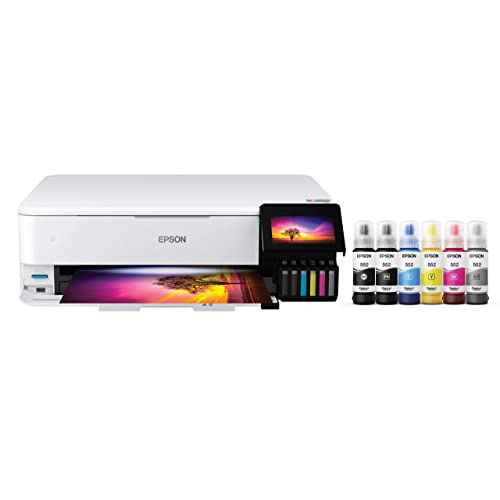
The Epson EcoTank Photo ET-8550 is a refillable-tank printer built for people who care about prints more than paperwork. It has a six-color Claria ET Premium ink system, wide-format output up to 13 x 19 inches, a 4.3-inch touch display and an SD card slot. In our lineup of home and home-office printers, it is the specialist: the one you buy for posters, photo gifts, crafts and art prints.
We did not handle this printer ourselves. This profile is built from Epson’s product page and explains the specs in plain English. To see where it fits among the other models, read our ranking of the best printers of 2026.
The Short Version
Most home printers aim at documents. The ET-8550 aims at images. It keeps the tank design that makes Epson’s EcoTank line popular, so you fill the printer from bottles instead of changing cartridges. It then adds a photo black bottle and a gray bottle to the usual black, cyan, magenta and yellow, which is the setup photo printers use to get smoother tones and better black-and-white prints.
The cost of that capability is physical. Epson lists it at 24.5 lb with a printing footprint of 20.6 x 29.8 x 16.9 inches. It also has a smaller paper capacity than office tank printers and a 1-year warranty. If you mostly print forms and shipping labels, it is overkill.
Who It Is For
- Photo hobbyists who print their own work at home and want borderless prints up to 13 x 19 inches.
- Crafters and small sellers making cards, art prints, labels, invitations and decorations who also want to print on thick media. Epson lists photo and specialty paper up to 300 g/m² and a rear feed for thick sheets.
- Families who want one capable machine for school projects and keepsakes and do not mind giving up a document feeder.
- Anyone who prints on discs. CD/DVD printing is still rare on modern printers.
Who Should Skip It
- Document-heavy offices. There is no auto document feeder listed, and the flatbed scanner works one page at a time. The Epson EcoTank ET-4950 is a better office pick, with a feeder, fax and Ethernet.
- Anyone short on space. At 24.5 lb and over 20 inches wide, it wants a dedicated shelf or desk.
- Occasional printers. A machine like this rewards regular use. If it sits idle for long stretches, a simpler model is wiser.
- Buyers who only want small snapshots. For 4 x 6 prints, a compact dye-sublimation printer such as the Canon SELPHY CP1500 is smaller and simpler.
Key Specs According to Epson
All of the following comes from Epson’s U.S. product page for the ET-8550.
- Ink system: Six-color, cartridge-free Claria ET Premium ink: black, photo black, cyan, magenta, yellow and gray. Bottles are 552 series, 70 mL each.
- Bottle yields (ISO pages per bottle): Photo black 7,300, black 6,700, cyan, magenta and yellow 6,200 each, gray 46,600.
- Resolution: Up to 5,760 x 1,440 dpi.
- Speed: 16 ppm black and 12 ppm color (ISO). For 2-sided printing, Epson lists 6 ppm black and 5 ppm color. A 4 x 6 inch borderless photo takes about 15 seconds in draft mode on Premium Glossy Photo Paper.
- Paper sizes: Up to 13 x 19 inches, including 11 x 17, Legal, Letter, 8 x 10, 5 x 7, 4 x 6 and envelopes. Custom sizes are supported.
- Paper handling: A 100-sheet plain-paper input, a secondary 20-sheet tray for 5 x 7 photo paper, and a rear feed that holds 50 plain sheets or 5 sheets of A3+ photo paper. Automatic 2-sided printing is listed.
- Display: A 4.3-inch color touch screen.
- Connectivity: Wi-Fi 5, Wi-Fi Direct, Hi-Speed USB and Ethernet, plus an SD card slot and a USB port for media.
- Scanner: A flatbed color scanner with a 1,200 x 4,800 dpi optical resolution and an 8.5 x 14 inch bed. Epson ScanSmart is the scan software.
- Copying: Up to 99 copies, 25 to 400 percent scaling, and automatic 1-sided to 2-sided copying.
- Size and weight: 20.6 x 29.8 x 16.9 inches when printing, 20.6 x 14.9 x 6.7 inches in storage, and 24.5 lb.
- Warranty: 1-year limited warranty in the U.S. and Canada.
Tank printers keep running costs low by selling ink in bottles with high rated yields. For the ET-8550, Epson’s own numbers tell the story. A photo black bottle is rated for 7,300 pages and each color bottle for 6,200. The gray bottle is rated for 46,600 pages because it is used sparingly, mostly for neutral tones and black-and-white prints.
Three points are worth keeping in mind:
- Yields are standardized estimates. Page yields are based on standardized pages with light coverage. Dense photos use far more ink per page, so photo printing will not reach those rated numbers.
- You buy six colors. More bottles mean more restocking, but you replace only the color that runs out.
- The comparison still favors tanks. Even with six colors, running costs are far lower than on cartridge photo printers, which is why people who print a lot choose tanks. The price you pay is the larger up-front cost of the machine.
Setup and Mobile Printing
Setup follows the EcoTank routine. You fill each tank from its bottle, let the printer prime and connect to your network. The 4.3-inch touch screen walks you through it.
For phones and tablets, Epson lists several options:
- AirPrint for iPhone, iPad and Mac.
- Epson Smart Panel, a free iOS and Android app for setup, monitoring and printing. Epson notes that the download is required and that data fees may apply.
- Wi-Fi Direct, which lets a phone or laptop talk to the printer without a router.
- Voice control through Siri and Amazon Alexa, plus Epson Connect, which requires an Epson Connect account.
The SD card slot is a useful extra for photographers, since you can print from a camera card without involving a computer.
What It Is Like to Live With
Based on Epson’s specs, this is a printer that wants room and a routine. The wide paper path, rear feed and secondary 5 x 7 tray give you flexibility: you can leave a stack of plain paper in the main tray and load specialty photo paper in the rear feed or secondary tray without swapping.
Speeds are decent for a photo printer. A borderless 4 x 6 inch photo in draft mode takes about 15 seconds, according to Epson, though higher-quality settings take longer. Two-sided documents are noticeably slower than one-sided ones, at 6 ppm black.
The scanner is a plain flatbed. That is fine for photos, art and the occasional document, but it will be slow for multi-page paperwork.
What to Check Before Buying
- Space and weight. Measure for a footprint that opens to about 30 inches deep when printing.
- Paper you plan to use. Epson’s page lists many sizes and weights. Confirm that your favorite photo or art paper fits the weight and thickness limits, which Epson gives as up to 300 g/m² and 1.3 mm (about 0.05 inch) through the rear straight pass.
- Documents. If you copy or scan stacks of pages, remember there is no feeder.
- Warranty. The included warranty is 1 year. Epson sells extended plans, so decide whether you want one.
- Ink bottles. Use the 552 series bottles listed on Epson’s page and match each color to its tank.
- Volume. This is a printer for people who print regularly. Check that your usage fits the machine.
Verdict
The Epson EcoTank Photo ET-8550 is the photo specialist in our lineup. It combines a six-color tank system, borderless output up to 13 x 19 inches, CD/DVD printing and a large touch screen. If those features describe what you want to print, nothing else in our lineup comes close. If you mostly print documents, the Epson EcoTank ET-4950 or a compact laser is the wiser pick, and if you only print snapshots, a Canon SELPHY CP1500 is simpler.
Use the Amazon button on this page to check the current listing, and compare it against the field in our best printers of 2026.
Sources