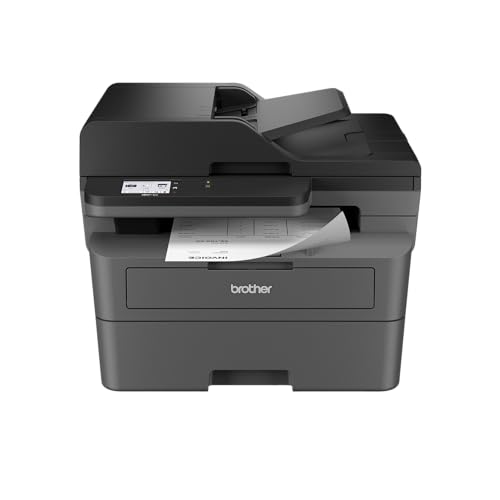
Some home offices live on paper: signed forms, tax documents, shipping labels, the occasional fax a bank or clinic still insists on. The Brother MFC-L2820DW is built for that kind of desk. It is a black-and-white laser all-in-one that prints, copies, scans and faxes, with a 50-page document feeder on top and automatic two-sided printing. This profile walks through what Brother says it does, what it leaves out, and what to check before you buy. For the full ranked list, see our best printers of 2026 comparison.
Who the Brother MFC-L2820DW Is For
This model suits people who print mostly text and want a machine that sits quietly in a corner until it is needed. Brother’s own description calls it black-and-white laser performance for small offices, and the specs back that up: up to 34 pages per minute for printing and copying, a time to first page of less than 8.5 seconds, and a recommended monthly volume of up to 2,500 pages.
It is a good match for:
- Remote workers and freelancers who sign, scan and send paperwork every week. The 50-page automatic document feeder handles a stack of pages without you standing over the glass.
- Small households with a home office that want one device for school assignments, mortgage paperwork and the occasional fax.
- Anyone tired of dried-out ink. A laser engine uses toner powder, so a printer that sits idle for weeks does not clog the way an inkjet can.
- Shared Wi-Fi homes. Dual-band wireless, Ethernet and USB are all built in, so you can put it on the network and forget about it.
Who Should Skip It
Skip the MFC-L2820DW if you want color, even occasionally. It cannot print or copy in color. Anyone printing photos, school posters or color charts should look at a refillable-tank inkjet, or a color laser such as the Brother HL-L3280CDW.
Also skip it if you do not need to scan, copy or fax. A print-only mono laser such as the Brother HL-L2460DW uses the same TN830 toner family, is far smaller, and is rated for a slightly higher print speed. And if you need to scan two-sided documents in one pass, note that Brother lists duplex scan and duplex copy as “No” on this model.
Key Specs, According to Brother
The figures below come from Brother’s product brochure for the MFC-L2820DW (the copy we opened is Brother Canada’s, for the same model number).
- Type: electrophotographic monochrome laser all-in-one: print, copy, scan, fax.
- Print speed: up to 34 ppm simplex; copy up to 34 cpm. Print resolution up to 1,200 x 1,200 dpi.
- Paper: 250-sheet tray, a single-sheet manual feed slot, 100-sheet output. Standard tray handles Letter, Legal, Executive and A4, among others.
- Document feeder: 50 pages, Brother says, based on 20 lb paper.
- Display: 2.7-inch touchscreen.
- Connectivity: wireless 802.11b/g/n (2.4 GHz) and 802.11a/n (5 GHz), Ethernet, Hi-Speed USB 2.0.
- Mobile: AirPrint, Mopria, Brother Mobile Connect for iOS and Android, Wi-Fi Direct, plus Alexa Print support.
- Fax: 33.6K bps modem, up to 400 pages of fax memory.
- Size and weight: 16.1 inches wide, 15.7 deep, 12.5 high, and 25.5 lb.
- Duty cycle: maximum of 35,000 pages per month, with a recommended volume of up to 2,500 pages.
- Certifications: Brother lists the model as ENERGY STAR qualified and EPEAT Silver rated.
- Warranty: 1-year limited.
Brother’s brochure lists 128 MB of memory and a 600 MHz processor, which is typical for the category. Those numbers rarely decide a purchase.
Toner and Running Costs
We do not quote cost-per-page figures, because they depend on current toner pricing and how you print. What we can say comes straight from Brother’s yield ratings. The standard TN830 cartridge is rated at 1,200 pages and the high-yield TN830XL at 3,000 pages, both under ISO/IEC 19752 (Letter/A4). The drum unit, DR830, is rated at about 15,000 pages. The box includes a starter toner cartridge rated at 700 pages and the drum.
Two practical points follow. First, the starter cartridge is small, so plan on buying toner sooner than you might expect from a laser. Second, going high-yield means fewer swaps, and a mono laser generally costs far less per page than a small cartridge inkjet, though it cannot print in color. Brother also notes that all yields depend on page coverage and media, so heavy graphics will shorten them.
Brother Refresh, Explained Plainly
The MFC-L2820DW is listed by Brother as “Refresh EZ Print Subscription Eligible.” Refresh is an optional service. According to Brother Canada’s product page for a sibling model, subscribers get toner delivered to their door when they need it. You do not have to sign up. The printer works normally with toner you buy yourself, and the subscription is a convenience for people who print on a steady schedule. Before you enroll, read the plan terms on Brother’s own site, since we have not opened them here and plan details can change.
Setup and Mobile Printing
Brother ships the printer with a quick setup guide, a power cord and a phone cord for fax. For wireless setup, the touchscreen walks you through joining your home network. Because the printer supports both 2.4 GHz and 5 GHz bands, it can sit on whichever your router prefers, though a stable 2.4 GHz connection often reaches farther from the router.
From an iPhone or iPad, AirPrint is the easiest route: choose Print in a document, pick the printer, and go. Android phones can use Mopria, which is built into recent versions of Android. Brother Mobile Connect adds scanning to your phone and some cloud-service features. Brother notes the app may require a free download and a connection to the same wireless network. Wi-Fi Direct lets a device print without joining the router, which is handy for guests.
Mac users should know Brother says printing or scanning through macOS requires AirPrint; Mac printer drivers are not provided.
What to Check Before You Buy
- Space. At 25.5 lb and a footprint of about 16 by 16 inches, this is not a shelf printer. Measure the spot, and leave room above for the document feeder.
- Phone line. To fax you need a landline or compatible phone service. If you will never fax, a similar print-only model may be a better value.
- Toner in the box. The included starter cartridge is rated at 700 pages. If your listing includes a TN830XL or an “XL” variant, you may get more included capacity, so read the bundle details.
- Your volume. A recommended monthly volume of up to 2,500 pages is plenty for most homes, but a small business printing every day should plan around it.
- Color needs. If there is any chance you will print in color, choose a different model now rather than buying a second printer.
- Subscription options. Decide up front whether you want Refresh, and confirm the plan terms with Brother.
How It Compares With Its Neighbors
Among our picks, the closest relatives are the Brother HL-L2460DW, which drops scanning, copying and fax for a smaller footprint, and the Brother HL-L3280CDW, which adds color but removes the scanner and fax. If you want one box that does everything office-related in black and white, the MFC-L2820DW is the one in this group that does. See the full ranking in our printer comparison.
The Bottom Line
The Brother MFC-L2820DW is a focused tool: quick text printing, a real document feeder, fax, and solid connectivity in a compact laser body. Its limits are just as clear. No color, no duplex scanning, and a small starter toner. If those fit your life, it is a practical choice for a paper-heavy home office. Use the button below the profile to see current pricing on Amazon.
Sources