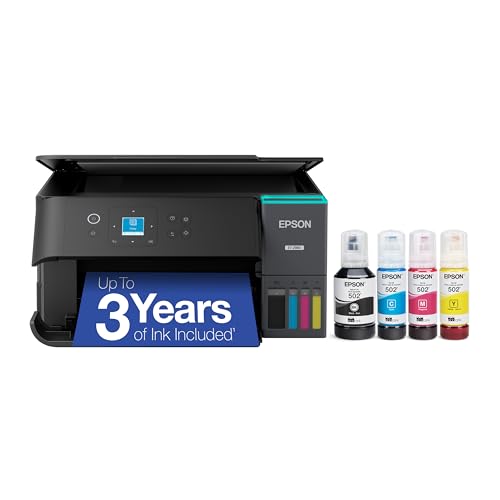
The Epson EcoTank ET-2980 is the small, simple end of Epson’s EcoTank family in our lineup. It prints, copies and scans, prints on both sides of the page automatically, and fills from bottles instead of cartridges. There is no document feeder and no wired network port, which is how Epson keeps the machine compact and the cost down relative to the bigger EcoTanks.
We did not handle this printer ourselves. This profile summarizes what Epson publishes on its product page and turns it into a plain-English buying guide. For the full ranking, see our best printers of 2026.
The Short Version
If you want a printer that mostly stays out of your way, the ET-2980 is built for that. Epson describes it as a 2025 model with part number C11CL41201, and also sells a white version under C11CL41202. The page says printing is 50 percent faster than the older ET-2850, with zero warm-up time.
Its selling point is the same as every EcoTank: the ink in the box goes a long way. Epson rates the included bottles at up to 6,600 black pages or 5,500 color pages, about 3 years at 125 pages per month. For a household that prints a few homework assignments, forms and photos each week, that is a lot of headroom.
Where it gives ground is convenience. The tray holds 100 sheets, scanning is flatbed only, and the display is a small 1.44-inch color screen. These are fair trades at this level, but they matter if your needs grow.
Who It Is For
- Families and students who print assignments, recipes and forms and want to stop buying cartridges.
- Light home offices that print and scan a few pages at a time.
- Small apartments and dorm rooms. A compact tank printer fits where a bigger all-in-one will not.
- iPhone and Android households that print mostly from phones through AirPrint or Mopria.
Who Should Skip It
- Heavy scanners and copiers. With no feeder, every page goes on the glass. The Epson EcoTank ET-4950 is the better fit for paperwork.
- Shared offices. The 100-sheet tray and 15 ppm black speed suit one or two users, not a team. A compact monochrome laser is a better choice for volume.
- Anyone who needs a wired network. Epson lists USB and Wi-Fi only.
- Photo-focused buyers. The ET-2980 is a general-purpose home printer. For serious photo prints, look at the Epson EcoTank Photo ET-8550.
- Very occasional printers. If you print a few pages a year, a tank system may not be worth it.
Key Specs According to Epson
All of the following comes from Epson’s U.S. product page for the ET-2980.
- Functions: Print, copy and scan. Epson’s page does not confirm fax, and we do not treat it as a fax machine.
- Print speed: 15 ppm black and 8 ppm color (ISO).
- Resolution: 4,800 x 1,200 dpi.
- Printhead: PrecisionCore Heat-Free, described by Epson as a permanent printhead designed to last the life of the printer.
- Paper: 100-sheet tray, with auto 2-sided printing.
- Display: 1.44-inch color display.
- Connectivity: Built-in USB and Wi-Fi.
- Mobile: Apple AirPrint, Mopria Print Service, Mopria Scan and the Epson Smart Panel app.
- Ink: Epson 502 bottles sold in combo packs. The ink maintenance box is T04D1.
- Included ink yield: Up to 6,600 black pages or 5,500 color pages, with some ink used for setup.
- Eco notes: RoHS compliant, with end-of-life recycling options, according to Epson.
Epson’s page does not list dimensions or weight in the text we read, and it points to a separate specification sheet. If space is tight, read that sheet.
We do not quote bottle prices, because they change and because the more useful story is how far the ink goes.
- What is in the box. Epson rates the included ink at up to 6,600 black pages or 5,500 color pages. That is the number to remember.
- Setup uses some of it. Epson says part of the included ink is used to prime the system, so replacement bottles have their own ratings. Check those ratings for the 502 series on Epson’s page.
- The comparison. Running costs are far lower than on cartridge models, which is why tank printers exist. You pay for that in the up-front price of the machine and, to a degree, in speed.
- Your pages will vary. Yields are standardized estimates. Heavy color or photo printing uses more ink than a plain text page.
Because the printhead is built to last the life of the printer, you are not budgeting for printhead replacements either.
Setup and Mobile Printing
You fill the tanks from the matching bottles, let the printer prime and connect it to Wi-Fi. The color display is small, so many people finish setup from a phone.
Epson lists these mobile options:
- Apple AirPrint for iPhone, iPad and Mac, with no app to install.
- Mopria Print Service and Mopria Scan for Android.
- Epson Smart Panel, a free app for enhanced printing and scanning. Epson says a download is required, most features need an internet connection and data fees may apply.
Since the ET-2980 has no Ethernet port, a solid Wi-Fi signal where the printer sits matters. If your router is far away, consider placing the printer closer or using the USB connection to a nearby computer.
What It Is Like to Live With
In daily use, the ET-2980 is a quiet, undemanding companion. At 15 ppm black, a 10-page document takes under a minute. Color pages are slower at 8 ppm, which is typical for a home tank printer. Auto 2-sided printing helps with school packets and reports.
Copying and scanning are where the missing feeder shows. For single pages, such as a receipt, a form or a photo, the glass is quick and easy. For anything over a few pages, you will wish you had stepped up. This is the main reason we rank the ET-4950 ahead of it.
The tray holds 100 sheets, which is fine for a household but means you will refill paper more often than on a 250-sheet model.
What to Check Before Buying
- Document feeder. There is none. Decide whether you can live with flatbed scanning.
- Network. Wi-Fi and USB only. Make sure your Wi-Fi reaches the spot where the printer will sit.
- Fax. Do not count on it. Epson’s page does not confirm fax for this model.
- Ink bottles. Buy 502 series bottles and the T04D1 maintenance box, and match each color to its tank.
- Color version. Epson sells black and white versions under different part numbers, so make sure the listing matches the one you want.
- Warranty. Epson’s page mentions a limited warranty without stating its length in the text we read, so confirm the term when you buy.
- Usage. Tank printers reward regular use. If the printer will sit idle for months, think twice.
Verdict
The Epson EcoTank ET-2980 is a sensible, no-frills tank printer. It suits students, families and light home offices who want low running costs, auto 2-sided printing and easy phone printing, and who can live without a feeder, Ethernet and a large tray. It is not the right pick for document-heavy work or for photo enthusiasts, and our ranking points those buyers to the Epson EcoTank ET-4950 and the Epson EcoTank Photo ET-8550.
Use the Amazon button on this page to see the current listing, and compare it with the field in our best printers of 2026.
Sources