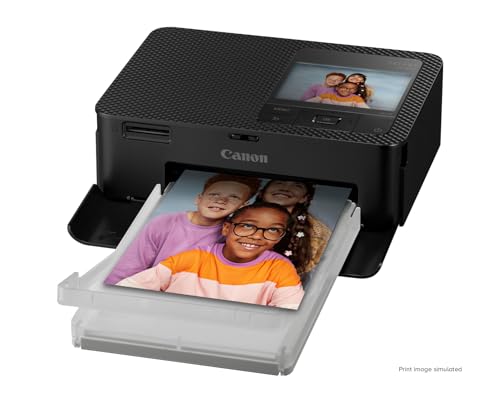
The Canon SELPHY CP1500 is a different kind of printer from everything else in our lineup. It does not print pages or scan anything. It makes small photo prints, mainly 4 x 6 inches, using a dye-sublimation process, and it is small enough to carry to a party or tuck in a cabinet. We include it because many people who search for a home printer really want photos, and this is the simplest way to get them.
We did not handle this printer ourselves. Canon’s U.S. page blocked our access, so this profile relies on Canon’s Asia specification page and Canon’s Canadian product page for the same model, and it keeps to what those pages say. For the rest of our picks, see the best printers of 2026.
The Short Version
Dye-sublimation printers work by transferring dye from a ribbon onto special paper in several passes and then adding a clear overcoat. The result, according to Canon, is a print that dries immediately and resists water and markers. The CP1500 prints at 300 x 300 dpi with 256 levels per color, and it lets you choose between glossy, semi-gloss and satin finishes.
You buy Canon paper-and-ink sets for it, and each set is designed to match. That keeps the process simple, since there are no tanks or cartridges to manage, but it is a different consumable model from an inkjet. Canon’s pages describe it as a compact, wireless, portable photo printer with a 3.5-inch display, an SD card slot and an optional battery.
If you want a printer for photo prints and nothing else, it is a good fit. If you want one printer for everything, look at the Epson EcoTank Photo ET-8550, which handles photos and documents.
Who It Is For
- Families who want prints on the fridge. Snapshots from a phone come out in under a minute each and are ready to handle right away.
- Parties, weddings and events. Canon says the printer can accept up to 8 devices at once by direct connection, which suits guests sharing photos.
- Scrapbookers and crafters. Card-size and label-size prints, plus layout features in Canon’s app, support collages, stickers and QR codes.
- People with a regular printer already. The CP1500 adds a photo option without changing how you print documents.
Who Should Skip It
- Anyone who needs documents, scans or copies. It does none of those. Consider the Epson EcoTank ET-4950 for paperwork.
- People who print large photos. The sizes top out at postcard size (4 x 6 inches). For 13 x 19 inch prints, you need a wide-format photo printer.
- Budget buyers counting every print. A SELPHY is a hobby printer. Per-print consumables are sold in sets, so check Canon’s current set sizes against how many prints you want.
- Households with weak Wi-Fi. Canon lists 802.11 b/g at 2.4 GHz only. If your phone cannot reach the printer, use the SD card or USB path.
Key Specs According to Canon
These details come from Canon’s Asia specification page and Canon’s Canadian product page. Neither is Canon’s U.S. page, so confirm details on Canon USA before buying.
- Print method: Dye-sublimation thermal transfer with an overcoat layer, 300 x 300 dpi, 256 levels per color.
- Print sizes: Postcard (4.0 x 6.0 inches), L size (3.5 x 4.7 inches), card size (2.1 x 3.4 inches) and square labels (2.1 x 2.1 inches), plus mini label stickers. Card and label sets need the Credit Card Paper Cassette PCC-CP400.
- Print time: About 41 seconds for a postcard-size print and about 23 seconds for card size, with the glossy finish.
- Finishes: Glossy, semi-gloss and satin, plus printable overcoat patterns.
- Display: 3.5-inch color LCD for viewing and editing, with filters such as sepia and black-and-white.
- Connections: Wi-Fi (2.4 GHz, 802.11 b/g), USB Type-C (USB 2.0) and an SD card slot, plus USB flash drive support. SD, SDHC and SDXC cards work directly, and smaller card formats need an adapter.
- Wireless limits: Unlimited simultaneous connections through a router, or up to 8 devices by direct connection.
- Apps: Canon PRINT Inkjet/SELPHY, SELPHY Layout (version 3.0 per Canon’s Canadian page) and AirPrint for iOS. Canon also lists Siri shortcuts on iOS.
- Battery: Optional NB-CP2LH, up to 54 prints per charge, or NB-CP2LI, up to 70 postcard prints, with about 4.5 hours to charge the NB-CP2LI. The printer ships with an AC adapter.
- Output tray: Up to 18 sheets.
- Size and weight: About 7.2 inches wide, 2.3 inches high and 5.2 inches deep, and about 1.9 lb (about 850 g).
A SELPHY has no tanks, so the usual “pages per bottle” math does not apply. Instead, Canon sells paper and ink as matched sets. Its Asia page lists a 4 x 6 inch set of 108 sheets, a larger set of 1,080 sheets, a 54-sheet postcard paper pack, and card and label sets of 18 or 36 sheets.
How to think about it:
- You pay per sheet, in sets. Each set contains a fixed number of prints. Divide the set price on Canon’s listing by the sheet count to see your own cost per print.
- Bigger sets lower the cost per print. The 108-sheet and 1,080-sheet sets exist for that reason.
- No waste from dried ink. Because ink comes with the paper, nothing clogs if the printer sits unused, which suits people who print only a few times a year.
- Compared with an inkjet. If you print many photos, a tank printer may cost less per photo, but you need a larger printer. The SELPHY wins on simplicity and size.
Setup and Mobile Printing
You plug in the printer, load a paper cassette and an ink cassette, and connect your phone. Canon lists three mobile paths:
- Canon PRINT Inkjet/SELPHY app for Wi-Fi printing.
- SELPHY Layout app, which adds collages, mini-sticker selection, pattern overcoats and QR codes that link to web pages. Canon also lists a built-in printer manual and spool printing.
- AirPrint for iPhone and iPad, with both devices on the same network.
You can also print without a phone by inserting an SD card or USB drive and using the 3.5-inch screen. That is a handy path for camera photos. Canon’s Asia page notes that USB printing from Windows 10 needs the 2022 update.
What It Is Like to Live With
In daily use, this is a countertop printer that behaves like an appliance. Prints come out in about 41 seconds at postcard size, so a batch of ten takes around seven minutes. Prints dry immediately, so there is no smudging or waiting. The output tray holds up to 18 sheets, so a party session works without constant attention.
At about 1.9 lb and the size of a small lunch box, the CP1500 is easy to store. The optional battery is what makes it portable. Without it, you need an outlet, so plan for that if you want to print at a park or a campsite.
What to Check Before Buying
- The battery. It is sold separately. Decide whether you need it.
- Paper and ink sets. Check which set sizes Canon sells in your area and whether the ones you want are in stock.
- Print size. Make sure 4 x 6 inches meets your needs.
- Wi-Fi. It is 2.4 GHz only. If your router combines bands under one name, it should still work, but check your network.
- Canon U.S. details. Because we could not open Canon’s U.S. page, confirm app names and included items on Canon USA, since app names vary by region (the Canadian page says “SELPHY Layout” while the Asia page says “SELPHY Photo Layout”).
- Documents. It cannot print them. Plan another printer for paperwork.
Verdict
The Canon SELPHY CP1500 is a simple, portable photo printer for postcard-size prints. It suits families, crafters and party hosts who want instant prints from a phone or SD card and are willing to buy Canon’s matched paper-and-ink sets. It is not an all-in-one and it is not for documents. Pair it with a tank printer like the Epson EcoTank ET-4950 or, for larger photo prints, step up to the Epson EcoTank Photo ET-8550.
Use the Amazon button on this page to see the current listing, and see how it compares in our best printers of 2026.
Sources