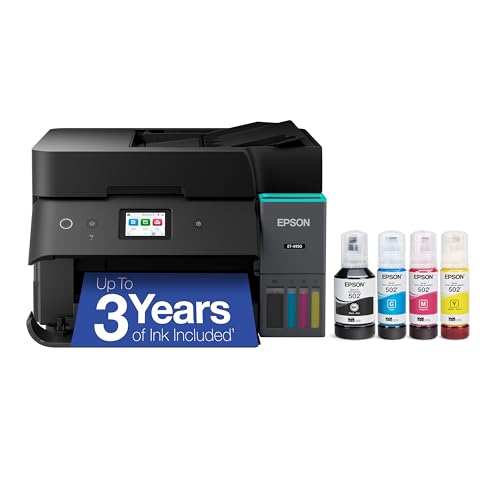
The Epson EcoTank ET-4950 is a refillable-tank all-in-one that aims at the home office rather than the photo hobbyist. You get printing, copying, scanning and faxing, an automatic document feeder, automatic 2-sided printing, Ethernet and Wi-Fi, and a 250-sheet paper tray. Instead of small cartridges, it uses ink bottles that you pour into tanks on the printer.
We did not handle this printer ourselves. This profile compares what Epson publishes on its own product page and explains, in plain English, who the model suits and who is better off with something else. For the full lineup, see our ranking of the best printers of 2026.
The Short Version
Think of the ET-4950 as the “do-everything” member of Epson’s EcoTank family in our lineup. It is the one that has the feeder and the fax, and that matters if you copy or scan multi-page paperwork. Epson’s page describes it as a 2025 model with part number C11CL40201.
The big appeal is running costs. Tank printers are designed so that the ink you buy later lasts far longer than a cartridge would, and Epson rates the ink that ships in the box for up to 6,600 black pages or 5,500 color pages. That is why we rank it first in our lineup for households that print regularly. The trade-offs are speed and size, because tank printers are generally slower and bulkier than a compact laser.
Who It Is For
- Home offices and remote workers who scan, copy and print documents every week and want a feeder instead of laying each page on the glass.
- Families with steady printing needs, such as school forms, recipes, shipping labels and the occasional color project, who are tired of watching cartridges run out.
- Small businesses that still use fax for contracts, medical offices or government forms. Not many tank printers include it.
- Anyone with a wired network. Ethernet is listed alongside Wi-Fi, which helps if your office router is across the room or Wi-Fi is unreliable.
Who Should Skip It
- Light, occasional printers. If you print a few pages a month, ink can dry out or sit unused, and a cheaper model without a feeder may be plenty.
- People who print mostly black text at high volume. A monochrome laser is faster per page, and Brother’s compact lasers in our ranking are designed for that job.
- Photo-first buyers. For serious photo work, a dedicated six-color printer such as the Epson EcoTank Photo ET-8550 or a small dye-sublimation printer will serve you better.
- Anyone short on desk space. The ET-4950 has a feeder on top, a tank system and a 250-sheet tray. Epson’s product page does not list its dimensions in the text we read, so check the specification sheet against your shelf before ordering.
Key Specs According to Epson
Everything below comes from Epson’s U.S. product page for the ET-4950.
- Functions: Print, copy, scan and fax.
- Print speed: 18 ppm black and 9 ppm color, measured by Epson to ISO/IEC 24734.
- Resolution: 4,800 x 1,200 dpi, using Epson’s PrecisionCore Heat-Free printhead.
- Paper: One 250-sheet tray. Epson lists auto 2-sided printing.
- Feeder: An auto document feeder. Epson does not state its capacity in the text we read.
- Display: 2.4-inch color display.
- Connectivity: Wi-Fi and Ethernet. Mobile options include Apple AirPrint, Mopria Print Service and Mopria Scan, plus the Epson Smart Panel app.
- Ink: Epson 502 bottles, with a 127 mL black bottle and 70 mL cyan, magenta and yellow bottles. The ink maintenance box is listed as T04D1.
- Included ink yield: Up to 6,600 black pages or 5,500 color pages, which Epson says is about 3 years at roughly 150 pages per month.
- Startup: Zero warm-up time, according to Epson.
Epson’s page links to a separate specification sheet for dimensions and weight, which we did not open. If size or weight matter to you, read that sheet first.
Ink is where tank printers earn their reputation. Rather than quote bottle prices that change, here is how to think about it:
- The box is already stocked. Epson says the included bottles are rated for up to 6,600 black or 5,500 color pages. For many households, that is years of printing.
- Replacement bottles are rated higher. Epson notes that part of the included ink is used to prime the system, so replacement bottles carry their own yield ratings. Look at those ratings on Epson’s page for the 502 bottles when you shop.
- The comparison that matters. Running costs per page are far lower than on typical cartridge models, which is the whole reason tank printers exist. The cost is paid up front in the printer itself.
- Yields are estimates. Epson’s figures come from standardized methods and your pages will vary with coverage, photos and how often you print.
Epson also lists a 502 combo pack among compatible accessories, which means you can restock all four colors in one purchase. Because the printhead is described as a permanent part built to last the life of the printer, you are not replacing printheads along with the ink.
Setup and Mobile Printing
Setup follows the usual tank routine. You fill each tank from its matching bottle, power on, let the printer prime and connect it to your network. The bottles are designed to be keyed to their tanks, which helps prevent mixing colors.
For phones, Epson lists three paths:
- Apple AirPrint for iPhone, iPad and Mac. There is no app to install, and the printer appears when you tap Print in a supported app, as long as both devices are on the same network.
- Mopria Print Service and Mopria Scan for Android and other devices.
- Epson Smart Panel, a free app for enhanced printing and scanning that Epson says requires a download. Epson also notes that most features need an internet connection and that data fees may apply.
Ethernet is the quiet advantage here. A wired connection is the most reliable way to share a printer with several computers, and many households and small offices still prefer it.
What It Is Like to Live With
Based on the specs, expect a printer that is steady rather than fast. At 18 ppm black, a 20-page document takes just over a minute, and color pages come out at about half that rate. For a home office that is perfectly fine. For a shared workgroup that prints stacks of pages, it may feel slow.
The feeder helps most with copies and scans. Instead of lifting the lid and placing every page, you load the stack and let the machine work. Combined with auto 2-sided printing, it handles the paperwork tasks that make people buy an all-in-one to begin with.
The 2.4-inch color display is small but is a step up from the tiny panels on many entry-level tank printers. It is where you will handle network setup, copy settings and fax numbers.
What to Check Before Buying
- Your paper path. One 250-sheet tray is generous for home use, but Epson’s page does not mention a second tray or a rear feed slot. If you print envelopes or thick media often, read the full specifications.
- Your phone line. Fax needs an analog phone line connection. If you have no use for fax, you may prefer a cheaper model without it.
- Space. Measure your shelf and leave room to open the scanner lid and the feeder.
- Your printing habits. Tank printers reward regular use. If a printer might sit idle for months, ask yourself whether the extra capability is worth it.
- Ink bottle model numbers. Match the 502 series bottles and the T04D1 maintenance box shown on Epson’s page, and avoid listings that do not state them.
- Warranty. Epson’s page mentions a limited warranty without stating its length in the text we read, so confirm the term at the time of purchase.
Compared With Its Neighbors
If you want a lower-cost EcoTank for lighter use and do not need a feeder, fax or a larger tray, look at the Epson EcoTank ET-2980. It uses the same 502 ink family and the same rated ink yield in the box, but it trades the feeder, fax, Ethernet and larger tray for a smaller, simpler machine. If photo output is the priority, the Epson EcoTank Photo ET-8550 adds a six-color ink set and wide-format printing.
Verdict
The Epson EcoTank ET-4950 is a sensible choice for a home office that prints and scans often and wants low running costs without giving up a feeder, 2-sided printing, Ethernet or fax. It is not the fastest option, and it is not the one to buy for photo prints or for an occasional-use household. If your printing looks like regular paperwork, it is one of the easiest recommendations in our ranking.
See the Amazon listing using the button on this page, and compare it with the rest of our picks in the best printers of 2026.
Sources