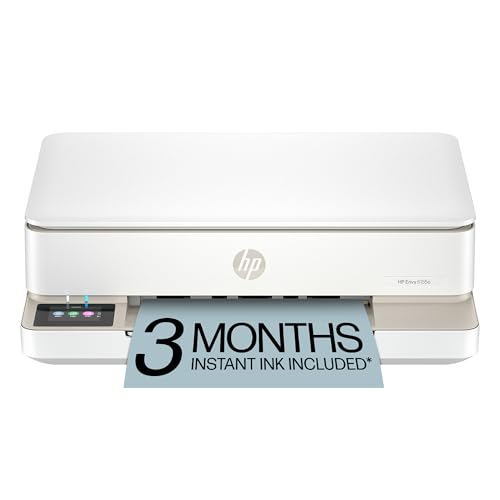
The HP Envy 6155e is a small, color all-in-one inkjet meant for ordinary home use: school assignments, boarding passes, recipes, a few photos. It is easy to set up through the HP app, prints on both sides of the page automatically, and fits on a bookshelf. It is also an “e” model, which brings HP+ rules, and it has become a discontinued product name as HP moves to a new one. This profile covers what HP says about it, what it does well, and who should look elsewhere. For where it falls in our lineup, see the printer comparison for 2026.
About the Name: Envy 6155e and Envy 6155
HP’s own store page for this printer is headed “HP Envy 6155e is Now the HP Envy 6155, AI-capable,” and it carries a “Discontinued” notice with a “Go to newer model” link. That tells us HP now sells the printer under the Envy 6155 name. We are not claiming the two are identical in every detail, and we have not compared them line by line. If you are shopping, read the current listing carefully, confirm the model name and number on the box or page, and treat any spec in this profile as belonging to the Envy 6155e datasheet we opened. Stock can also vary by retailer, so a listing you find may be for either name.
Who the HP Envy 6155e Is For
HP’s datasheet describes it as a wireless all-in-one color photo printer for home use, and the specs are sized to match: a monthly duty cycle of up to 1,000 pages, a 100-sheet input tray and a 25-sheet output tray.
It is a good match for:
- Light home printing. If you print a few pages a week, the modest speed and small paper tray will not get in your way.
- Students and families. HP lists automatic duplex printing as standard, plus borderless photo printing on photo paper and a range of media sizes from 3 x 5 inches up to Letter size.
- Small spaces. HP lists the product at about 17.05 inches wide and 5.35 inches high, with a depth of about 14.21 inches when closed (about 20.19 inches with trays open).
- People who like phone-first setup. The HP app handles setup, printing and scanning from your phone.
- Buyers who want a color printer without a big commitment. It is entry-level within our lineup.
Who Should Skip It
Skip the Envy 6155e if you print a lot. HP rates it at up to 10 pages per minute in black (ISO) and 7 in color, and its standard cartridges are small. Heavy users should consider a refillable-tank printer, which Epson and Canon make, or a laser such as the Brother HL-L3280CDW.
Skip it too if HP+ does not suit you (details below), if you need an Ethernet port, which HP does not list, or if you need a document feeder, which the datasheet’s paper-handling section does not list either. For busier home offices, look at the HP OfficeJet Pro 9135e, which has an automatic document feeder, fax, two paper sources and Ethernet, though it comes with the same HP+ rules.
HP+ and Original HP Ink, Explained Plainly
HP’s datasheet states: “This is an HP+ enabled printer. Choose HP+ at product setup to activate benefits. HP+ requires an HP account, ongoing connection to the internet, and exclusive use of Original HP Ink cartridges for the life of the printer.”
In plain terms:
- You need an HP account.
- The printer needs to stay connected to the internet.
- If you choose HP+, you commit to Original HP ink in this printer for good.
HP’s store page also says this is a dynamic-security printer. That means it is intended to work with cartridges that carry a new or reused HP chip, and HP can block other chips through firmware updates. Anyone who wants to refill or mix brands should think hard before choosing HP+ at setup.
HP’s page also lists a free 3-month Instant Ink trial through HP+. Instant Ink is HP’s optional ink subscription. We do not list plan prices here, because they change; read HP’s current terms before enrolling.
Key Specs, According to HP
The figures below come from HP’s Envy 6155e datasheet and HP’s store page for the printer.
- Functions: print, copy, scan and mobile fax (send only).
- Speed: up to 10 ppm black and 7 ppm color (ISO).
- Resolution: black up to 1,200 x 1,200 rendered dpi from a computer; color up to 4,800 x 1,200 optimized dpi on selected HP photo papers; scan up to 1,200 x 1,200 dpi hardware, 1,200 dpi optical.
- Display: 2.4-inch color capacitive touchscreen (320 x 240).
- Paper: up to 100 sheets in, 25 sheets out; up to 10 envelopes or 40 cards. Duplex is automatic.
- Connectivity: dual-band Wi-Fi 802.11a/b/g/n/ac and one Hi-Speed USB 2.0 port.
- Mobile: HP app, Apple AirPrint, Chrome OS, HP Print Service Plugin, Mopria.
- Duty cycle: up to 1,000 pages per month (Letter size).
- Materials: HP says the design uses 60 percent recycled plastic. The store page shows an ENERGY STAR mark.
Cartridges and Running Costs
We do not give cost-per-page numbers or cartridge prices. The maker’s yields tell the story: HP rates the HP 68 black cartridge at about 160 pages and the HP 68 tri-color at about 120 pages, with a higher-capacity HP 68e black rated at about 320 pages. The printer ships with setup cartridges.
Those are small numbers. A tri-color cartridge, where one color running out means replacing the entire cartridge, can be expensive for anyone who prints regularly, and compared with refillable-tank printers the running costs of a small-cartridge inkjet like this are far higher. This is the main reason the Envy 6155e fits light users. If you print a lot, a tank printer or laser model will usually be far cheaper to run, and it is worth looking at the Instant Ink subscription terms on HP’s own site to see whether it suits your volume.
Setup and Mobile Printing
Setup is built around the HP app: install it, sign in, and it connects the printer to your Wi-Fi and helps you set up HP+ if you choose it. HP highlights dual-band, self-healing Wi-Fi that tries to reconnect on its own if the connection drops.
iPhone and iPad owners can print with AirPrint without installing anything. Android phones can use the HP Print Service Plugin or Mopria. Chromebooks are supported. Because there is only a USB port and no Ethernet, wireless is the main way to get on a network, though USB works for one computer.
What to Check Before You Buy
- Which name is on the box. Confirm whether the listing says Envy 6155e or Envy 6155, and read its specs.
- HP+ decision. Know what you are agreeing to when you pick HP+ at setup.
- Cartridge sizes. Look at which cartridges are included, and compare the maker’s page yields.
- Speed and tray. Ten pages per minute in black and a 100-sheet tray are fine for light use, not for bulk jobs.
- No document feeder or Ethernet. Both are missing from the datasheet.
- Fax. Mobile fax sends only. If you need to receive faxes, choose another model.
How It Compares With Its Neighbors
Within our lineup, the Envy 6155e is the light-duty color pick. The HP OfficeJet Pro 9135e is its far more capable sibling, with a document feeder, fax, Ethernet and a heavier duty cycle. If you only need black-and-white text, the Brother HL-L2460DW is a compact laser with lower running costs. See the whole ranking in our printer comparison.
The Bottom Line
The HP Envy 6155e is a small, easy-to-live-with color all-in-one for light printing, with automatic duplex and a friendly app. Its tradeoffs are plain: the HP+ system, small cartridges, modest speed and a model name that HP has now moved to Envy 6155. Light home users will be fine. Frequent printers should compare other options. Use the Amazon button on this page to check the current listing.
Sources