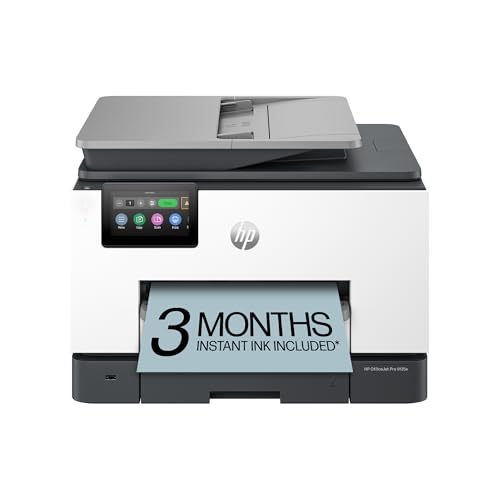
The HP OfficeJet Pro 9135e is a color inkjet all-in-one aimed at small offices, and it is among the most feature-heavy models in our lineup. It prints, copies, scans and faxes, holds paper in two separate 250-sheet sources, and feeds scans from a 35-sheet document feeder. It is also an “e” model, which means it comes with HP+, and that detail matters more than any spec. This profile explains both sides so you can decide with open eyes. For how it stacks up against everything else we picked, see our printer comparison for 2026.
Who the HP OfficeJet Pro 9135e Is For
HP’s own page describes this printer as a professional color inkjet for a growing business, and the hardware matches. Consider it if you:
- Run a home business or work from home daily. A 30,000-page monthly duty cycle, per HP, is far above what a household uses. That headroom matters mostly for durability.
- Print on more than one kind of paper. With a 250-sheet input tray plus a separate 250-sheet multipurpose tray, you can keep letter-size plain paper in one and something else in the other.
- Scan stacks of paper. The 35-sheet automatic document feeder lets you copy or scan a short contract without lifting the lid for every page.
- Still send faxes. HP lists fax among the functions and two RJ-11 ports for a phone line.
- Want color documents without a color laser’s footprint. Thermal inkjet color works well for charts, presentations and mixed text-and-graphics pages.
- Are comfortable with HP’s account system. If you already use the HP app and do not mind signing in, the setup is straightforward.
Who Should Skip It
Skip the 9135e if the idea of locking your printer to one ink brand bothers you. HP+ is not a minor setting on this model; it is part of how the printer is sold. Skip it as well if you print only a handful of pages a month. A printer designed for a busy small office is more machine than you need, and a lower-volume model such as the HP Envy 6155e can cover light home use at a smaller size.
If your work is mostly black-and-white text, a mono laser like the Brother MFC-L2820DW offers a document feeder and fax at a lower purchase cost and with toner instead of liquid ink. And if you want to pour in bulk ink from bottles rather than buy cartridges, look at refillable-tank models instead.
HP+ and Original HP Ink, Explained Plainly
HP states that the 9135e is an HP+ enabled printer. According to HP, choosing HP+ at product setup activates its benefits, and HP+ requires three things:
- An HP account.
- An ongoing connection to the internet.
- Exclusive use of Original HP ink cartridges for the life of the printer.
In everyday terms, that means the printer is tied to your HP account and your Wi-Fi, and it is meant to be used only with HP-branded ink. HP’s listing also states that dynamic security is enabled: the printer is intended to work only with cartridges that have a new or reused HP chip, and firmware updates may block cartridges that previously worked if they carry a non-HP chip. HP adds that a reused HP chip allows reused, remanufactured and refilled cartridges, but the practical effect for most buyers is simple: plan to buy HP-branded cartridges.
Read HP’s HP+ terms on its own site before you commit. We have not quoted any subscription prices, because they change.
Instant Ink, in One Paragraph
HP’s listing for the printer promotes Instant Ink, which HP describes as a smart ink delivery service. A short trial comes with HP+ setup. Instant Ink is optional: you can buy cartridges normally instead. If you do enroll, check what happens when the trial ends and how the plan handles unused pages before you start. We keep prices out of this profile on purpose; the plan pages on HP’s site are the right place to compare them.
Key Specs, According to HP
The details below come from HP’s product-details page for the OfficeJet Pro 9135e (product number 404M0A), as opened on HP’s regional site.
- Functions: print, copy, scan, fax.
- Print speed: up to 25 ppm black and up to 20 ppm color, with HP’s footnotes applying.
- Print quality: black up to 1,200 x 1,200 rendered dpi.
- Print technology: HP thermal inkjet.
- Paper handling: 250-sheet input tray, 250-sheet multipurpose tray and a 35-sheet automatic document feeder.
- Borderless printing: yes, on photo paper only, up to 8.5 x 11 inches.
- Scanning: optical resolution up to 1,200 dpi.
- Connectivity: Ethernet, dual-band Wi-Fi 802.11 a/b/g/n/ac, Hi-Speed USB 2.0 device and host ports, and two RJ-11 fax ports.
- Mobile printing: HP app, Apple AirPrint, Wi-Fi Direct printing and Mopria certification, plus Chrome OS.
- Duty cycle: up to 30,000 pages per month.
- Sustainability: HP says the printer uses 40 percent recycled plastic.
HP’s page does not state automatic two-sided printing in the specs we opened, so confirm duplex on the current listing before you rely on it.
Ink and Running Costs
We do not quote cost-per-page numbers or cartridge prices. Running costs on inkjets depend on how much you print, which cartridge size you buy and whether you use a subscription. What is certain is that this model uses four separate cartridges, so you can replace only the color that runs out. Compare the maker’s page yields for the cartridge sizes sold with the printer, and expect a high-yield cartridge to lower the cost of each page compared with a standard-size one. Next to a refillable-tank printer, a cartridge-based inkjet like this one will generally have higher running costs, in exchange for faster speeds, a document feeder and fax.
Setup and Mobile Printing
HP’s app is the center of setup: you download it, sign in with an HP account, and it walks the printer onto your network. Because HP+ needs that account, you will be signing in whether or not you use the app much afterward. The printer supports dual-band Wi-Fi, which HP describes as self-healing; Ethernet is a wired alternative for a desk that is close to the router.
For iPhone and iPad, AirPrint needs no driver: pick Print, choose the printer, done. Android phones can use Mopria or the HP app. Wi-Fi Direct lets a guest print without joining your network. Chrome OS is also supported.
What to Check Before You Buy
- Phone line for fax. Fax needs a working phone line. If you never fax, you are paying for a feature you will not use.
- HP+ comfort. Are you fine with an HP account, an internet connection and HP-only ink? If not, pick another model.
- Size. Two paper trays and a feeder make this a large printer. Measure your shelf.
- Duplex and cartridge details. Check the live listing for automatic two-sided printing and for which cartridges are included, since bundles vary.
- Volume. If you print little, a smaller, lighter printer fits better.
- Replacement ink. Confirm you are happy with the ink options HP sells for this model.
The Bottom Line
The HP OfficeJet Pro 9135e gives a home office a lot: color printing, fax, a document feeder and two paper sources, all behind a modern wireless setup. The tradeoff is the HP+ system, which ties the printer to an HP account and Original HP ink. If you are comfortable with that, it is a capable workhorse. If you are not, our comparison of the best printers lists other ways to go, including toner-based laser printers such as the Brother MFC-L2820DW.
Sources