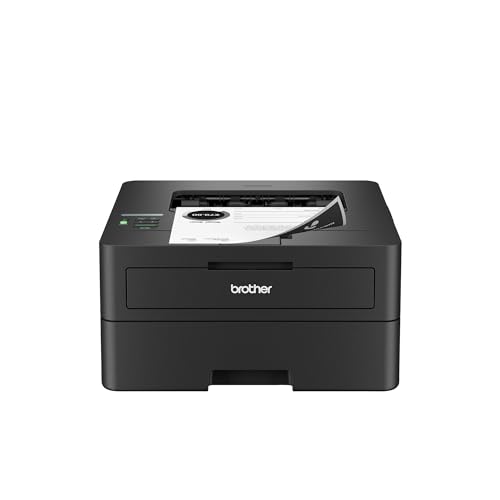
For a lot of people, the best printer is the one that quietly prints a page of black text when asked and otherwise stays out of the way. The Brother HL-L2460DW is built on exactly that idea. It is a compact monochrome laser printer with automatic two-sided printing, dual-band Wi-Fi, Ethernet and a 250-sheet tray. It has no scanner and no color, and that focus keeps it small. Here is what Brother says it does, who it fits, and what to check before you buy. To see where it lands against every other model we picked, read our printer comparison for 2026.
Who the Brother HL-L2460DW Is For
Brother’s own description is “efficient, affordable black and white laser output” for home or small offices in a compact footprint. The brochure backs it up: print speeds up to 36 pages per minute, a time to first page of less than 8.5 seconds, and a recommended monthly volume of up to 2,500 pages.
It is a good match for:
- Students and remote workers who print papers, forms and shipping labels. Black-and-white laser text is crisp, dry the moment it lands, and does not smear.
- Small apartments and shared desks. At 14.0 inches wide, 14.2 deep and 7.2 high, and 15.6 lb, that is noticeably smaller and lighter than Brother’s all-in-one MFC-L2820DW.
- Households that print in bursts. Toner does not dry out the way liquid ink can, so a printer that sits for weeks is ready when you need it.
- Anyone who already scans with a phone. Phone scanning apps handle most paperwork, which makes the missing scanner less of a loss.
- People who want wired and wireless options. Ethernet, USB and dual-band Wi-Fi are all included.
Who Should Skip It
Skip the HL-L2460DW if you need color. Anyone printing school posters, charts or photos should look at the Brother HL-L3280CDW, a color LED printer, or one of the refillable-tank printers in our ranking.
Skip it too if you need to scan, copy or fax from the machine itself. The Brother MFC-L2820DW uses the same TN830 toner family and adds a 50-page document feeder, scanning and fax. And if you want a touchscreen, note that the HL-L2460DW has a one-line LCD, according to Brother, so menu navigation is basic.
Key Specs, According to Brother
These figures come from Brother’s brochure for the HL-L2460DW (the copy we opened is from Brother Canada, for the same model).
- Type: electrophotographic monochrome laser, print only.
- Speed: up to 36 ppm; first page in less than 8.5 seconds.
- Resolution: up to 1,200 x 1,200 dpi.
- Paper: 250-sheet standard tray, a single-sheet manual feed slot, 100-sheet output.
- Duplex: automatic two-sided printing on Letter, Legal and Folio.
- Display: 1-line LCD.
- Connectivity: wireless 802.11b/g/n (2.4 GHz) and 802.11a/n (5 GHz), Ethernet and Hi-Speed USB 2.0.
- Mobile: AirPrint, Mopria, Brother Mobile Connect and Wi-Fi Direct, plus Alexa Print.
- Language: PCL6.
- Memory and processor: 128 MB and 600 MHz.
- Size and weight: 14.0 x 14.2 x 7.2 inches and 15.6 lb.
- Duty cycle: up to 35,000 pages per month; recommended volume up to 2,500 pages.
- Labels: ENERGY STAR qualified and EPEAT Silver rated, per Brother.
- Warranty: 1-year limited.
Toner and Running Costs
We do not quote per-page costs or toner prices, since they move. We can quote Brother’s rated yields, which Brother footnotes as approximate yields:
- TN830: standard-yield toner at about 1,200 pages.
- TN830XL: high-yield toner at about 3,000 pages; also sold in a two-pack.
- DR830: drum unit at about 15,000 pages.
- In the box: a starter toner rated at about 700 pages, plus the drum.
The starter cartridge is small, so expect your first replacement sooner than you think. After that, the XL cartridge costs more at the register but gives you about two and a half times the pages of the standard one, which is why most regular printers choose it. In general, a mono laser has far lower running costs than a cartridge inkjet doing the same text jobs, and it will not clog when idle. Brother notes real yields vary with coverage and media.
Brother Refresh, Explained Plainly
Brother lists the HL-L2460DW as “Refresh EZ Print Subscription Eligible.” Brother Canada’s product page for a sibling model describes the service as toner delivered to the subscriber’s door when needed. It is optional. The printer works with toner you buy yourself, and plenty of buyers will never need a plan. If you consider it, read the current terms on Brother’s own site, since we have not opened them and details change.
Setup and Mobile Printing
Setup is simple: plug in, join your network from the printer’s menu or from the Brother app, and install the driver on your computer if you want one. With a one-line LCD, the phone app can be easier for entering a Wi-Fi password than the printer itself. Dual-band wireless lets you use the 5 GHz or 2.4 GHz network, and Ethernet gives you a wired option.
iPhone and iPad owners can use AirPrint right away. Android phones can use Mopria or the Brother Mobile Connect app. Wi-Fi Direct is useful for visitors. Brother notes that macOS printing goes through AirPrint, and that Mac printer drivers are not provided.
What to Check Before You Buy
- Scanner. There is none. If you sometimes need to copy a page, plan for a phone scanning app or a different model.
- Color. Print jobs come out black and white only.
- Toner size. Check whether your listing includes standard or XL toner, and expect the starter to be rated at about 700 pages.
- Paper size. The tray takes Letter, Legal and several other sizes, but check the duplex sizes if you print legal documents on both sides.
- Display. A one-line LCD means app-based setup is the easier route.
- Your volume. Recommended monthly use is up to 2,500 pages, which is generous for most homes.
How It Compares With Its Neighbors
Within our lineup, the HL-L2460DW is the simplest. The Brother MFC-L2820DW adds scanning, copying and fax with a larger body. The Brother HL-L3280CDW adds color but costs you desk space. If your printing is text, the HL-L2460DW covers it with less machine. See where it ranks in our best printers comparison.
The Bottom Line
The Brother HL-L2460DW does a small number of things and does them well: fast black-and-white printing, automatic duplex, flexible connections and a small footprint. It is not for color or for scanning. If your pages are mostly text, it is a sensible pick. Check the Amazon button on this page for current pricing.
Sources