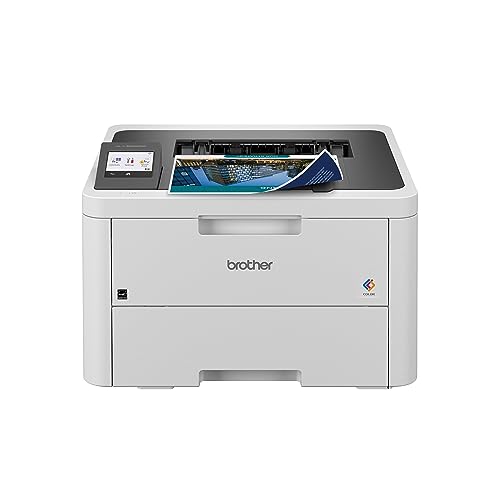
Color lasers used to mean big, loud, expensive office machines. The Brother HL-L3280CDW is a different animal: a compact color LED printer meant for a home office or a small team, with automatic two-sided printing, gigabit Ethernet and a 2.7-inch touchscreen. It does one job, printing, and leaves scanning and faxing to other machines. This profile covers what Brother says it does, where it falls short for some households, and what to check before you buy. You can also compare it with every other model in our printer comparison for 2026.
Who the Brother HL-L3280CDW Is For
Brother pitches the printer at small teams and shared workspaces, and that is a sensible reading of the spec sheet. Up to 27 pages per minute in both color and black and white, a time to first page of less than 13.5 seconds, a recommended monthly volume of up to 3,000 pages and a 250-sheet paper tray all point to steady everyday printing.
It is a good match for:
- Home offices that print color documents. Proposals, invoices with logos, charts and school projects print in color without you worrying about clogged print heads on a printer that sits unused.
- Households with several users. Wi-Fi on two bands, gigabit Ethernet and mobile compatibility make it easy for laptops and phones to share one printer.
- People who print text-heavy pages in bursts. Laser-style output is crisp on plain paper and dries instantly, so there is no smearing.
- Buyers who care about energy and sustainability labels. Brother lists the printer as ENERGY STAR qualified and EPEAT Silver rated.
Who Should Skip It
If you need to scan or copy, skip this model. It has no scanner at all. Compare it with the Brother MFC-L2820DW, which adds scanning, copying, a document feeder and fax in black and white only, or choose a color all-in-one. People who print many photos should also look elsewhere: a toner-based printer is built for documents, not glossy prints.
Also skip it if you print only a few pages a month and want the lowest possible upfront cost. A color laser has four toner cartridges, plus a drum set, a belt unit and a waste-toner box, which is more to maintain than a simple monochrome model such as the Brother HL-L2460DW. If you never print color, the HL-L2460DW is simpler and lighter.
Key Specs, According to Brother
The numbers below come from Brother’s brochure for the HL-L3280CDW (the copy we opened is from Brother Canada, for the same model) and the Brother Canada product page.
- Type: digital color LED printer, print only.
- Speed: up to 27 ppm in color and black and white; first page in less than 13.5 seconds.
- Resolution: up to 2,400 x 600 dpi class.
- Paper: 250-sheet tray, a single-sheet manual feed slot for envelopes and specialty paper, 150-sheet output.
- Duplex: automatic two-sided printing, for Letter, Legal and Folio, among other sizes.
- Display: 2.7-inch color touchscreen.
- Connectivity: wireless 802.11b/g/n (2.4 GHz) and 802.11a/n (5 GHz), gigabit Ethernet and Hi-Speed USB 2.0.
- Mobile: AirPrint, Mopria, Brother Mobile Connect and Wi-Fi Direct, plus Alexa Print.
- Languages: PCL5e, PCL5c, PCL6, BR-Script3, PDF 1.7 and XPS 1.0.
- Memory and processor: 256 MB and 800 MHz.
- Size and weight: 15.7 inches wide, 15.7 deep and 10.8 high, at 33.9 lb.
- Duty cycle: maximum of 40,000 pages a month, recommended volume up to 3,000 pages.
- Labels: ENERGY STAR qualified and EPEAT Silver rated, per Brother.
- Warranty: 1-year limited.
Brother also lists security features aimed at offices, including secure print, TLS/SSL, IPsec, IP filtering and firmware encryption. A home user may never touch them, but they are there if the printer ends up on a shared network.
Toner and Running Costs
We stay away from cost-per-page numbers, since toner prices change. What we can quote is how many pages Brother says each part is rated for, under ISO/IEC 19798:
- Standard cartridges: TN229 black at about 1,500 pages; cyan, magenta and yellow at about 1,200 pages each.
- High-yield cartridges: TN229XL black at about 3,000 pages; cyan, magenta and yellow at about 2,300 pages each.
- Drum unit: DR229CL at about 30,000 pages; the box includes a drum set rated at about 20,000 pages.
- Belt unit: BU229CL at about 50,000 pages. Waste toner box: WT229CL at about 30,000 pages.
- In the box: starter cartridges rated at about 1,000 pages each.
Two things stand out. The color toners are rated lower than the black, so a color-heavy household will replace them sooner. And the high-yield cartridges cost more up front but last roughly twice as long as the standard ones, which is why most frequent printers choose them. Compared with a small cartridge inkjet, a color laser spreads its running costs across long-lived parts, so heavy printing generally costs less per page; compared with a refillable-tank printer, it will generally cost more per color page.
Brother Refresh, Explained Plainly
Brother lists the HL-L3280CDW as “Refresh EZ Print Subscription Eligible.” Brother Canada’s product page describes the service this way: subscribers get toner delivered to their door when they need it. It is optional. Without it, you buy toner whenever you like, from Brother or elsewhere. If you are tempted by the subscription, look up the plan terms and what the plan counts as a page on Brother’s own site, since we have not opened those details and they can change.
Setup and Mobile Printing
Setup runs through the touchscreen: pick your Wi-Fi network, enter the password, and install the driver or app on your computer. Because Brother supplies both 2.4 GHz and 5 GHz radios, you can pick the band that suits your router. Gigabit Ethernet is the stable option if the printer sits near the router.
From an iPhone or iPad, use AirPrint. On Android, Mopria print service is built into recent versions, and Brother Mobile Connect adds a Brother-specific route. Wi-Fi Direct lets a visitor print without joining your network. Brother notes that macOS printing and scanning go through AirPrint, with no Mac printer drivers provided, and that wireless needs a connection to a wireless network.
What to Check Before You Buy
- No scanner. Be sure you do not need to copy or scan, or that you have another way to do it.
- Size and weight. At 33.9 lb, this is a two-handed lift. Plan the spot before the box arrives.
- Toner included. Starter cartridges are rated at about 1,000 pages each; plan to buy replacements early if you print a lot.
- Color use. If you rarely print color, remember that unused color toner and drums still age. A mono model may suit you better.
- Photos. This is a document printer. For photo prints, see our other picks.
- Subscription. Decide whether you want Refresh and read the terms before enrolling.
How It Compares With Its Neighbors
The HL-L3280CDW sits between the print-only Brother HL-L2460DW, which is black and white and much smaller, and the all-in-one Brother MFC-L2820DW, which scans, copies and faxes but does not print color. If color matters and scanning does not, this is the one. The full ranking is in our printer comparison.
The Bottom Line
The Brother HL-L3280CDW is a practical, well-connected color printer with strong paper handling and solid labels for energy and recycling. It is print-only and carries the upkeep of four toners, but for a home office that wants crisp color documents without ink worries, it is a sensible pick. Use the Amazon button on this page to check the current price.
Sources