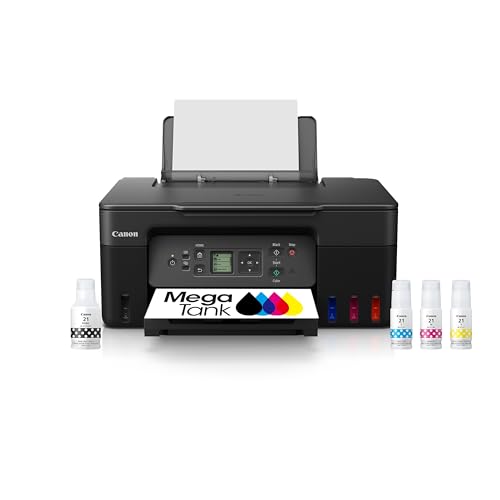
The Canon PIXMA G3270 is a compact refillable-tank all-in-one: it prints, copies and scans, and you refill it from ink bottles instead of buying cartridges. Canon sells it under the MegaTank name. In our lineup, it is the budget-minded tank option for people who want low running costs and decent photos without the size of a home-office machine.
We did not handle this printer ourselves, and Canon’s own U.S. page blocked our access. This profile relies on the Digital Trends page on the G3270 and states only what that page says. For the full ranking, see our best printers of 2026.
The Short Version
The G3270 is for the household that prints a mix of homework, forms and photos, mostly from phones and laptops. According to Digital Trends, it is “priced right, has low ink costs, and produces great photo prints.” The same page lists a long set of limits: slow document handling, a basic display, no feeder and no duplex.
That combination makes it an easy fit for casual users and a poor fit for busy offices. If you scan stacks of pages, the Epson EcoTank ET-4950 is better equipped. If your needs are lighter and you want something close in spirit to the G3270, the Epson EcoTank ET-2980 is its closest neighbor in our lineup.
Who It Is For
- Families and students who print a moderate amount and want to stop worrying about cartridges.
- Phone-first households. Digital Trends reports that it works with iPhone, Android, Windows, macOS and ChromeOS, and a link button simplifies Wi-Fi connection to a phone.
- People who print photos now and then. Borderless output and accurate colors, according to Digital Trends, suit family photos and school projects.
- Small spaces. At about 13.2 lb, it is light and compact for a tank printer.
Who Should Skip It
- Document-heavy users. No automatic document feeder and no duplex scanning means page-by-page work.
- Anyone who prints long reports. Digital Trends calls document printing slow, and there is no automatic 2-sided printing.
- Standing users. Digital Trends notes that the 1.4-inch monochrome screen is angled for seated users and does not tilt.
- Offices that share a printer. The 100-sheet tray and 11 ipm black rating suit one or two people.
- Buyers who want a wired network. The Digital Trends page mentions Wi-Fi connection and does not mention Ethernet, so check Canon’s listing if you need a cable connection.
Key Specs According to Canon and Digital Trends
We could not open Canon’s U.S. page, so the specs below are those reported by Digital Trends, which attributes the speed and yield figures to Canon.
- Functions: Print, copy and scan. No automatic document feeder, according to Digital Trends.
- Speed: About 11 ipm black and 6 ipm color, according to Canon. Digital Trends found these accurate for its unit but still called document work slow.
- Photos: A full-page borderless photo takes about a minute.
- Ink yield: About 6,000 black or 7,700 color pages per full set of bottles, according to Canon. The printer ships with full bottles.
- Paper: A tray for up to 100 sheets or 20 photo cards (4 x 6 inches).
- Display: 1.4-inch monochrome, not a touchscreen and not adjustable.
- Connectivity: Wi-Fi with a link button that helps connect a phone. Works with Windows, macOS, iPhone, Android and ChromeOS. Canon PRINT app and AirPrint supported.
- Scanner: Flatbed. Digital Trends reports good quality and color accuracy, with mobile scanning capped at 300 dpi versus 600 dpi from a computer.
- Size and weight: About 16.4 x 13.3 inches and 7 inches tall with trays closed, 13.2 lb. It needs about 22 inches of depth when printing, and the rear tray raises the height to about 12 inches.
The reason to buy a MegaTank is the cost of ink. Instead of quoting bottle prices, which change, here is the way to think about it.
- Full bottles are included. Canon rates a set at about 6,000 black or 7,700 color pages. Digital Trends highlights the low ink costs as a core strength.
- The comparison. Running costs are far lower than on a cartridge printer, which is why people accept a higher price for the machine itself.
- Yields are estimates. Canon’s figures come from standardized pages. Photos and heavy color use more ink.
- Color goes further. The color yield is rated higher than black on this model, which suits photo and project printing.
We do not repeat bottle costs here. If you want exact figures, read the Digital Trends page and Canon’s listing for current numbers.
Setup and Mobile Printing
Setup is the usual tank routine: fill each tank from its bottle, power on and let the printer prime. Then connect it to Wi-Fi. Digital Trends says a link button makes this simpler when you connect from a phone.
On mobile, the Canon PRINT app handles most jobs, according to Digital Trends. It reports one snag: printing envelopes from the app failed, and using AirPrint from the iPhone’s Files app worked instead. That is a reminder to keep both routes in mind. AirPrint needs no app, while the Canon PRINT app is Canon’s own route.
What It Is Like to Live With
Expect a slow-and-steady printer. Digital Trends reports that a full-page borderless photo takes about a minute, and that document printing and scanning feel slow. The tray holds 100 sheets, or 20 photo cards if you load 4 x 6 inch paper.
The design is simple, and so are the controls. The monochrome screen is small and fixed, and it is angled for someone sitting. The rear tray folds up, which raises the height to about 12 inches and means you should leave headroom under a shelf.
Photo results are the high point. Digital Trends praised borderless prints and accurate colors, although it noted that photos on plain paper came out washed out. In practice, that means you will want photo paper for pictures.
What to Check Before Buying
- Document needs. If you copy or scan more than a few pages at a time, the missing feeder will annoy you.
- Two-sided printing. There is none. Plan to flip pages by hand.
- Space. You need roughly 22 inches of depth when printing, and about 12 inches of height with the rear tray open.
- Paper. Use photo paper for photos. Plain paper gave washed-out results, according to Digital Trends.
- Mobile apps. Keep AirPrint in mind if the Canon PRINT app struggles with a particular job.
- Bottles and warranty. Confirm the bottle type and warranty terms on Canon’s listing when you buy, since we could not open Canon’s page.
Verdict
The Canon PIXMA G3270 is a good-value, low-running-cost printer for casual home use, especially if your printing is a mix of school documents and photos from phones. It lacks a feeder and duplex, and it is slow, so it is not the right tool for office work. If you want more features in a tank printer, the Epson EcoTank ET-4950 is the step up, and if you want a simpler Epson alternative, look at the Epson EcoTank ET-2980.
Use the Amazon button on this page to see the current listing, and compare it with the other picks in our best printers of 2026.
Sources